
- Move to next workflow step
- Send candidate communication
- Send interview scheduling invitation
- Notify the hiring team
- Trigger the next action
Applicant tracking for teams that hire at volume
Hire with clarity, from requisition to first day.
Hirebridge Recruiter gives recruiters, hiring managers and HR one place to post jobs, move candidates, collect interview feedback and report on every hire, with the audit trail enterprise compliance demands.
Configured to your hiring process
Guided implementation
EEO and OFCCP reporting built in
Built for mid-market and enterprise HR teams that hire across many locations, shifts and job families.
Healthcare
Logistics
Financial services
Hospitality
Retail
Staffing
How a hire moves
One connected path, with the right person acting at every step.
Every stage below is a real status in Recruiter. Nothing advances without the approval, screen or scorecard it needs, and every move is time-stamped for the audit trail.
My Workspace
Start the day knowing exactly what needs you.
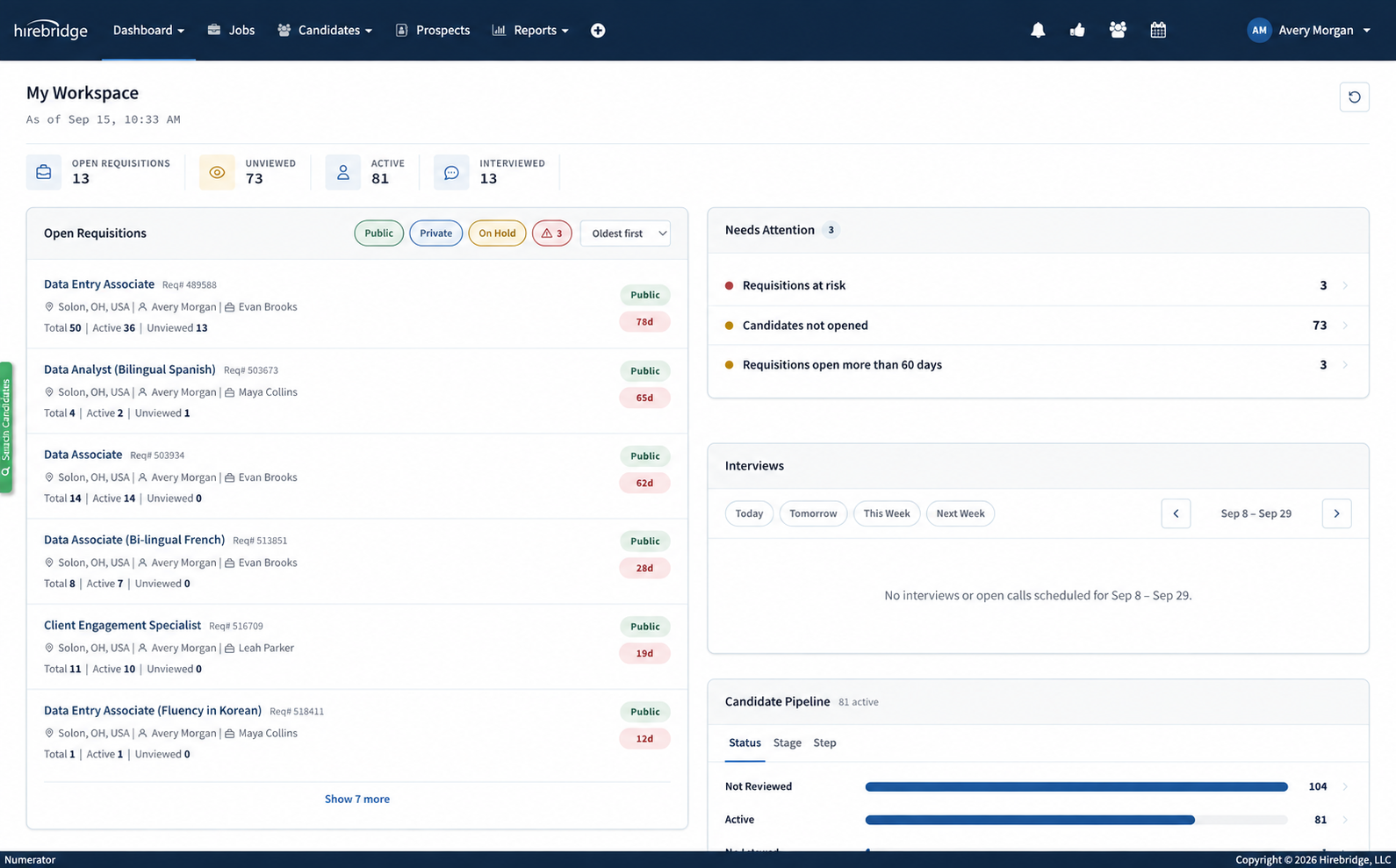
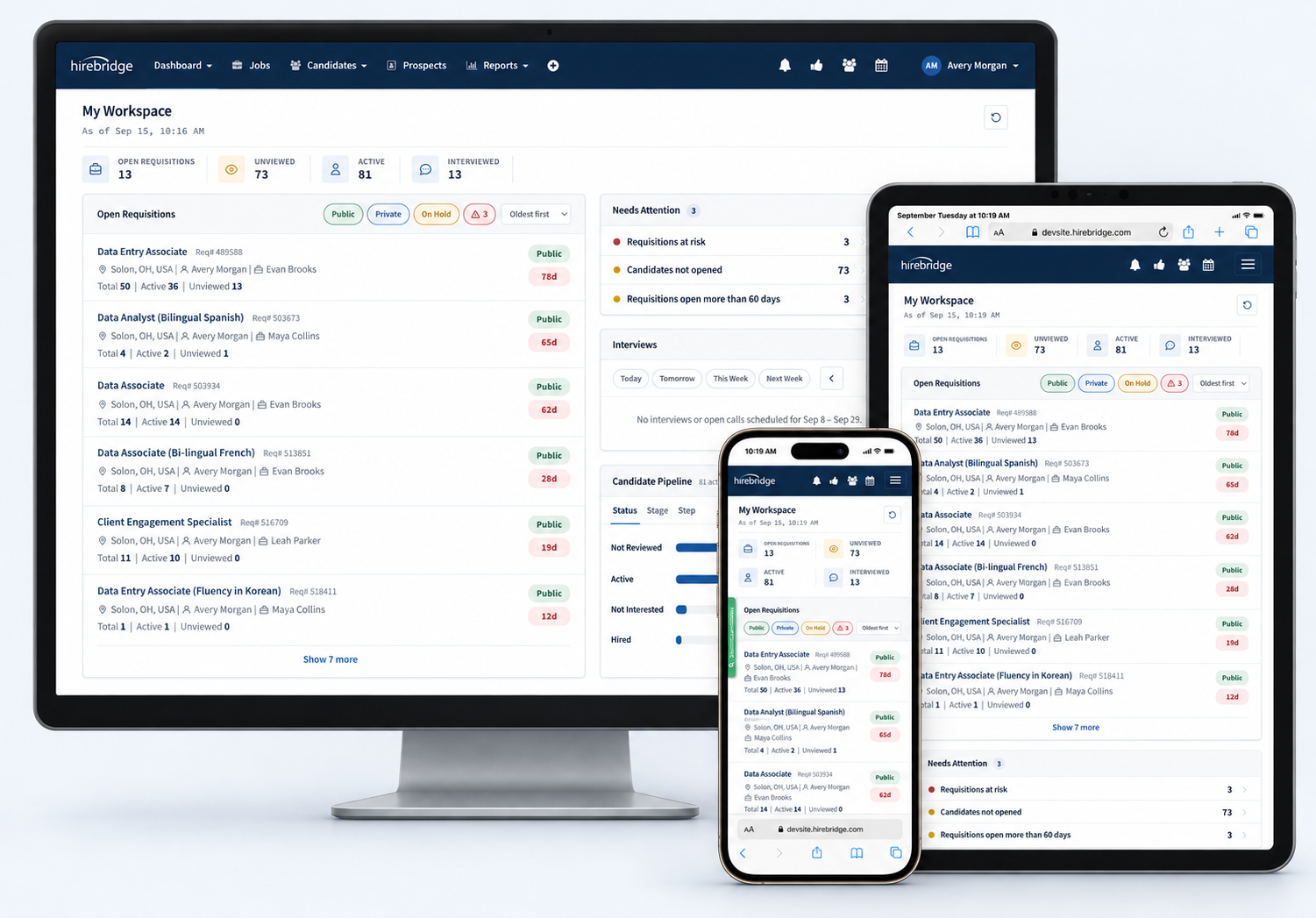
My Workspace is the recruiter's home screen: what is at risk, who is waiting, and where every open requisition stands. Every line is a link into the work, and the review queue opens straight into Rapid Review.
Needs Attention
Requisitions at risk, candidates nobody has opened, candidates waiting for review and requisitions past 60 days, each with a count and a link into the list.
Open Requisitions and Pipeline
Every req with its total, active and unviewed candidates, visibility, days open and owner, plus active candidates rolled up by status, stage or workflow step.
Candidates to Review
The review queue, newest or oldest first, with how long each candidate has waited. One click opens the whole queue in the Rapid Review deck.
Rapid Review + Workflow Automation
Review candidates. Make a decision. Keep moving.
Candidate review shouldn't require opening records, navigating through pages and repeatedly returning to a candidate list. Rapid Review accelerates the human decision. Workflow Automation accelerates everything that follows.
One streamlined workspace
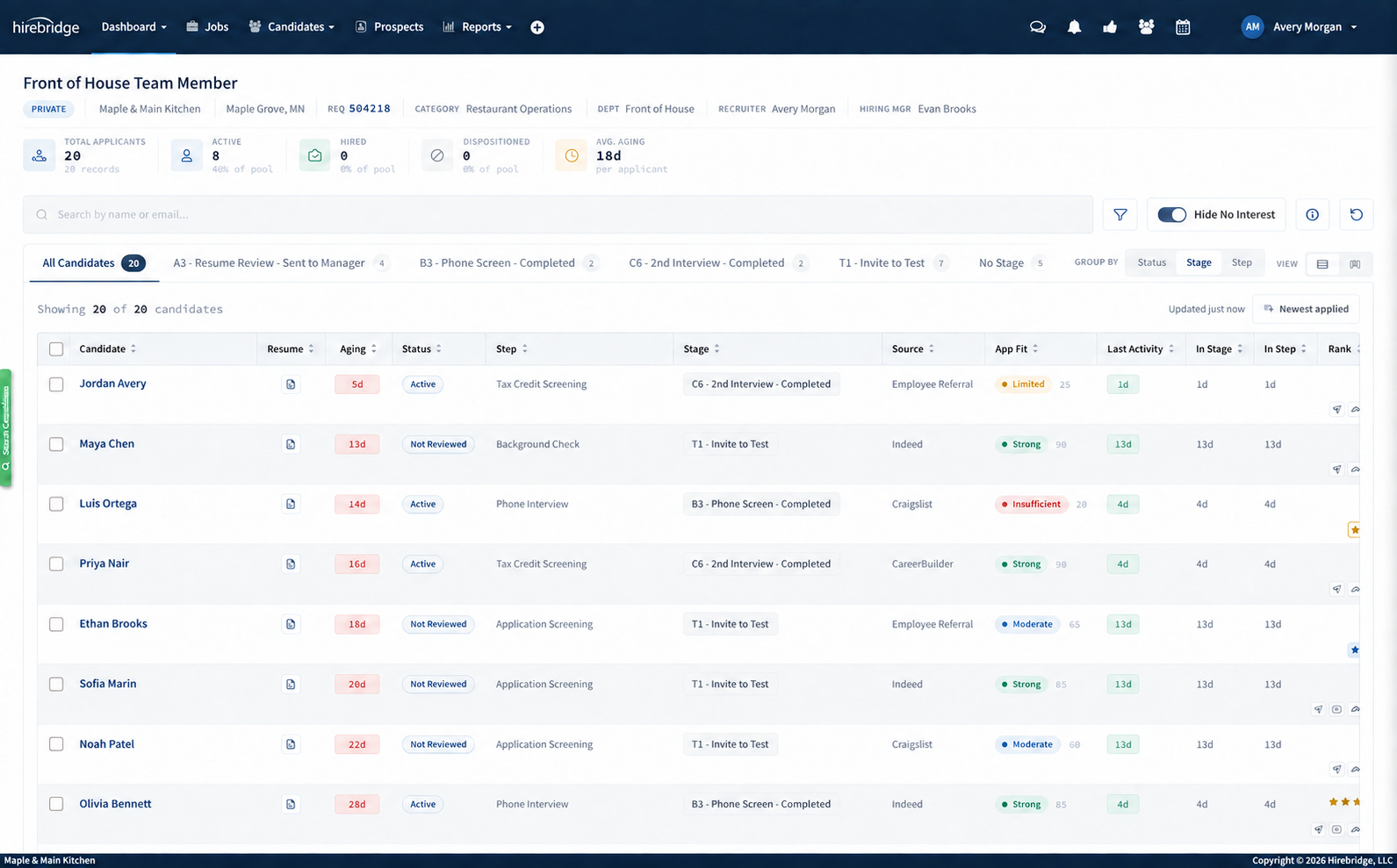
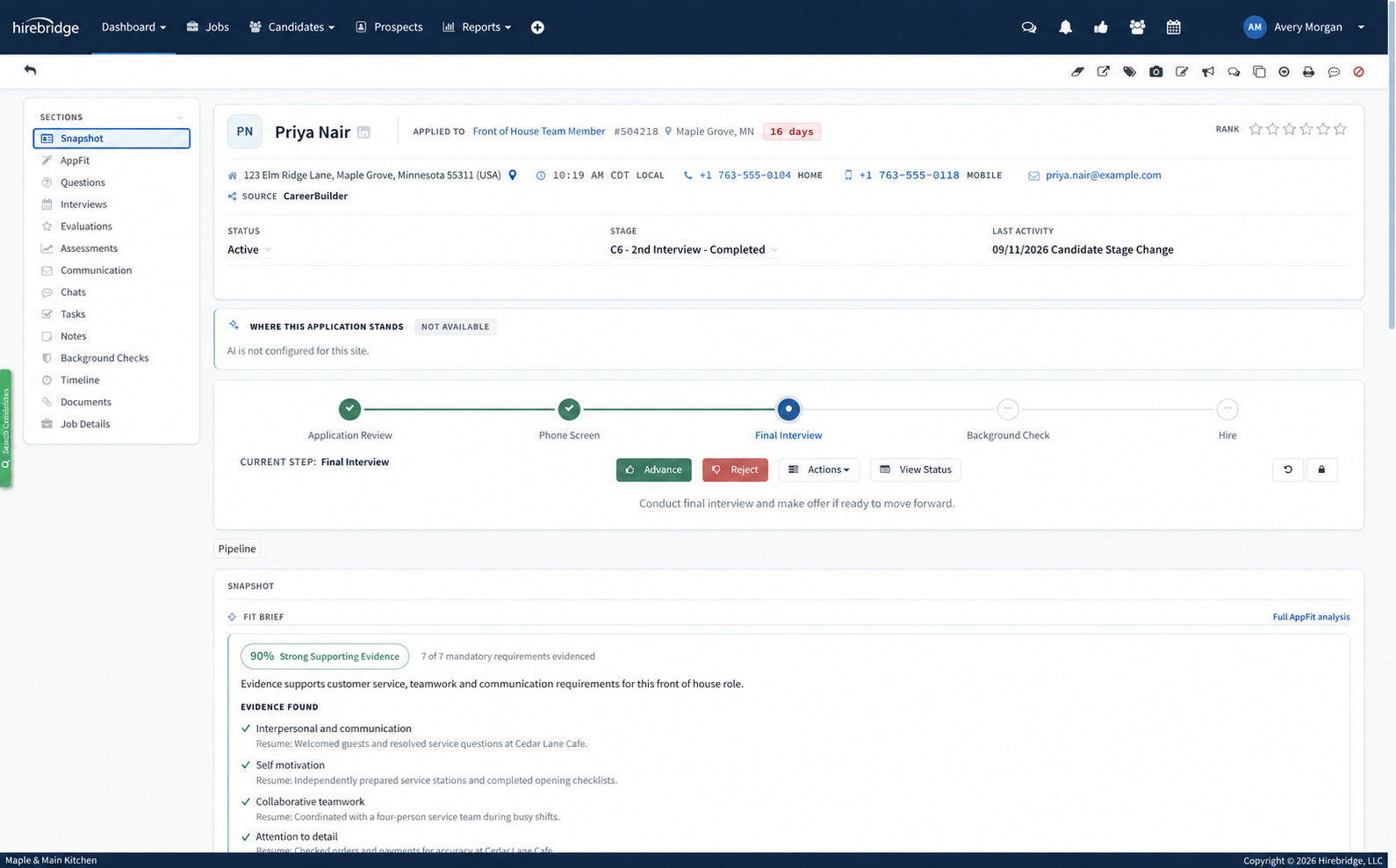
Rapid Review gives recruiters and hiring managers a place to work through candidates one after another, with the information they need to make the next decision. Accessed directly from My Workspace, reviewers move quickly through candidates without losing their place or interrupting their workflow.
Review the candidate. Make a decision. Move to the next.
Built for different roles, and different levels of control
Recruiters can be given permission to advance or disposition candidates directly from Rapid Review. Hiring managers and other reviewers can use a simplified experience, marking a candidate No Interest without making a final disposition. The recruiter is then automatically notified that the candidate is awaiting disposition.
You decide who can review, who can advance and who can make final candidate decisions.
One decision can start the next process
Rapid Review is connected directly to your Hirebridge workflow. When a reviewer selects Advance, the candidate moves into the next workflow step, where your configured automation can immediately take over.
- Record reviewer feedback
- Move immediately to next candidate
- Notify recruiter
- Candidate awaits final disposition
Rapid Review makes the decision simple. Workflow Automation handles what happens next.
Faster review without sacrificing control.
Rapid Review removes unnecessary navigation while preserving the permissions, workflows and automation your organization has already defined.
Less clicking. Faster decisions. A hiring process that keeps moving.
What's inside
Recruiter at the center of your hiring workflow.
Manage applicants, interviews and hiring decisions in Recruiter. Onboard and AppFit require Recruiter; VIP can also work standalone, and Engage connects to compatible ATS platforms. Compare product availability and discuss the products and integrations for your plan.
Job posting and career pages
Publish once to your branded career site and the major job boards. Mobile-first application flows keep hourly and salaried candidates from dropping off.
- Branded, embeddable career pages with search, filters and map view
- One-click distribution to boards and aggregators
- Requisition templates and approval routing
Candidate pipeline
Drag candidates through configurable stages, with knockout questions, ranking and duplicate detection doing the first pass for you.
- Custom workflows per job family or location
- Rapid Review for one-at-a-time screening decisions
- Bulk actions, templated email and SMS
- Searchable talent pool with tags and re-engagement
Interview scorecards
Structured scorecards tied to the competencies in the job, so every panelist rates the same things and consensus is visible before the debrief.
- Scorecard and survey builder with weighted competencies
- Calendar-synced scheduling and reminders
- Overdue feedback flagged on the requisition
Offers, eForms and onboarding
Manage offers in Recruiter, then use Hirebridge Onboard for new-hire documents, e-signatures and task checklists. Onboard requires Recruiter; discuss your product configuration with Hirebridge.
- Offer letter templates with approval workflows
- Embeddable eForms with signature capture and auto-date
- I-9, tax, policy and consent packets
Reporting and analytics
Time to fill, source of hire, funnel conversion and recruiter workload, filtered by location, department or job family and exportable for the board deck.
- Open jobs, candidate funnel and hired reports out of the box
- Drill-down dashboards with saved filters
- Scheduled email delivery to executives
Compliance
Applicant flow, EEO and OFCCP reports generate from the same data your recruiters work in, so there is no second system to reconcile at audit time.
- Voluntary self-identification and disposition codes
- Record retention rules by jurisdiction
- Full audit log of every status change
Integrations
Recruiter sits in the middle of the stack you already run.
Bring candidate information into Recruiter and connect hiring workflows to external systems. Available connections and data transfers depend on the systems and integrations configured for your team.
- Inbound: career site, job boards, referrals, agency submissions and manual entry all land in the same pipeline.
- Outbound: configure supported connections for HRIS, payroll, background screening and e-signature workflows.
- Open: integration options tailored to your existing systems.
Reporting
Answer the questions leadership asks, before they ask.
Every report reads from the live pipeline, so time to fill on Monday is the same number your recruiters saw on Friday. Drill into any figure by location, department, recruiter or source.
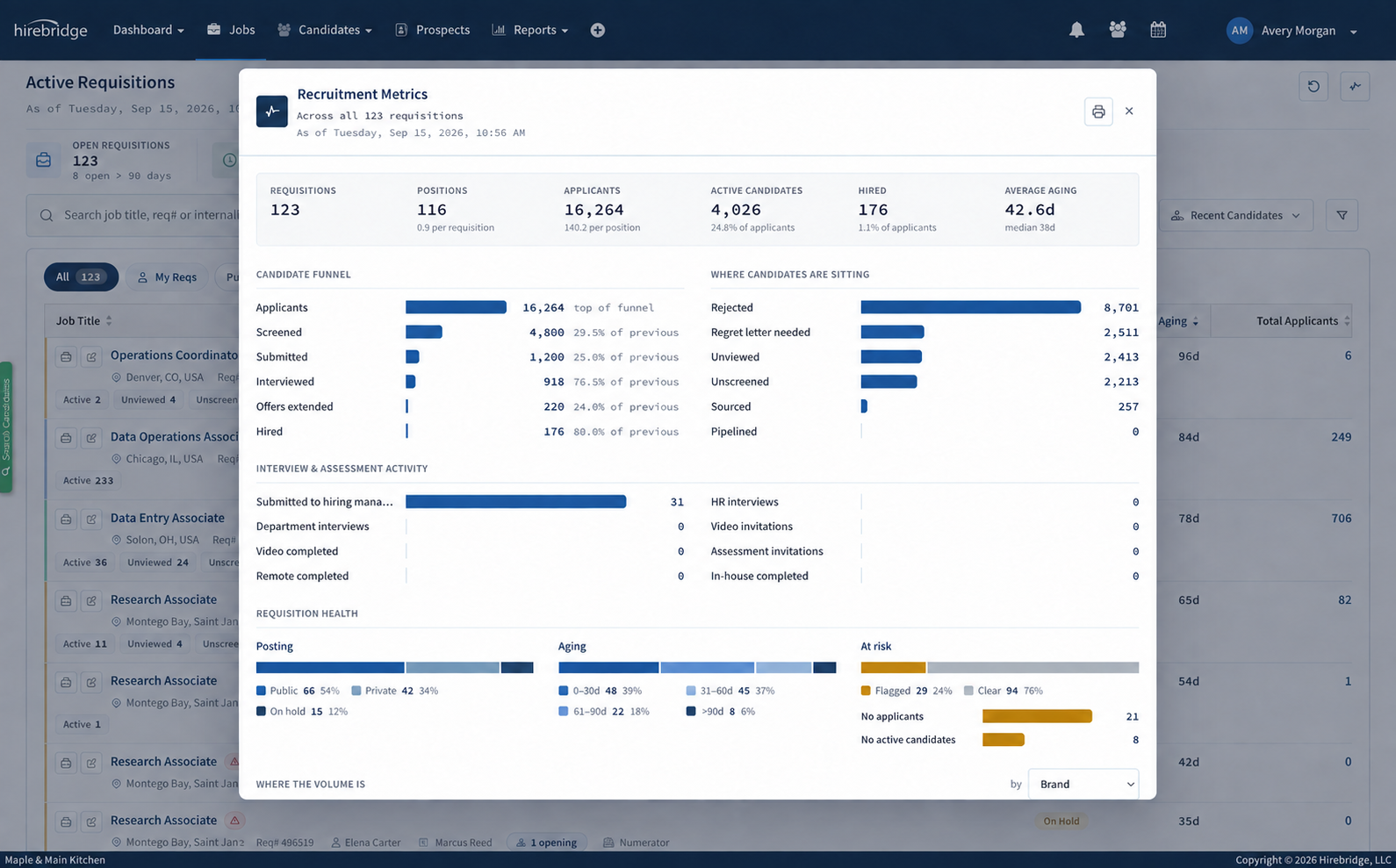
Candidate funnel · Registered Nurse · last 90 days
Sample dataApplied1,240100%1,240 candidates · 100% of applied
Screened41233% of applied412 · 33% of applied · 33% stage pass rate
Interviewed9623% of screened96 · 8% of applied · 23% stage pass rate
Offers1415% of interviewed14 · 1% of applied · 15% stage pass rate
Hired1179% accepted11 hired · 79% offer acceptance
Open jobsTime to fillSource of hireRecruiter workloadHired candidatesEEO / OFCCP applicant flowAging requisitions
Median time to fill
31days
↓ 6 days vs prior quarter
Offer acceptance
89%
↑ 4 pts vs prior quarter
Requisitions filled per week · 12 weeks
Sample account. Your dashboard reads from your own requisitions.
Built for the whole hiring team
Three seats at the table. One view of the truth.
Spend the day on candidates, not admin.
Post once, screen automatically, message in bulk and see every overdue scorecard or stalled req on one board.
"I open one screen in the morning and I know exactly which twelve people need me today."
Approve, interview and decide from your inbox.
Requisition approvals, interview invites and scorecards arrive as links. No training, no separate login to remember.
"The debrief takes ten minutes because everyone's scores are already side by side."
Configure it once, trust it at audit time.
Own workflows, permissions, forms and retention rules. Pull the applicant-flow report knowing it matches the pipeline.
"Our OFCCP audit was a two-hour export instead of a two-week reconstruction."
Data and governance
Understand how your candidate data is handled.
Review our privacy information, subprocessors, and data protection policies with your team.
Pricing
A configuration that fits your hiring.
Hirebridge starts at $99/month with Express for small teams. Recruiter ATS starts at $300/month, with setup starting at $1,500. Talk with our team about the product and configuration that fit your hiring.
Discuss pricing
See it with your own requisitions
Thirty minutes. Your job families, your workflow, your questions.
We'll walk through a live requisition end to end, then show what migration from your current ATS looks like. No slideware.
Plan your implementation with our team
Discuss your data migration